Nerd It Out: White and Blacklists for Affiliates

This post is also available in:
 PT
PT  ES
ES
Updated: 14th of October, 2025
An affiliate marketer’s toolkit is a lot like Batman’s utility belt – packed with gadgets that help you navigate tough spots, but only useful if you know when and how to use them. Whitelists and blacklists remain among the most powerful tools in that kit.
These lists help you identify and boost high-performing ad zones while eliminating low-performers that drain on your budget.
White and black lists still remain a tricky thing for beginners affiliates, so we asked Roman S., professional media buyer, to tell us how it actually works.
And here’s what we uncovered.
What are White and Blacklists?
“In simple terms, whitelists and blacklists are two faces of the same coin,” says Roman. “At the same time, it’s important to note that different industries and offers will have distinct lists, so you’ll want to create many directories and keep them organized so that you can use them easily.”
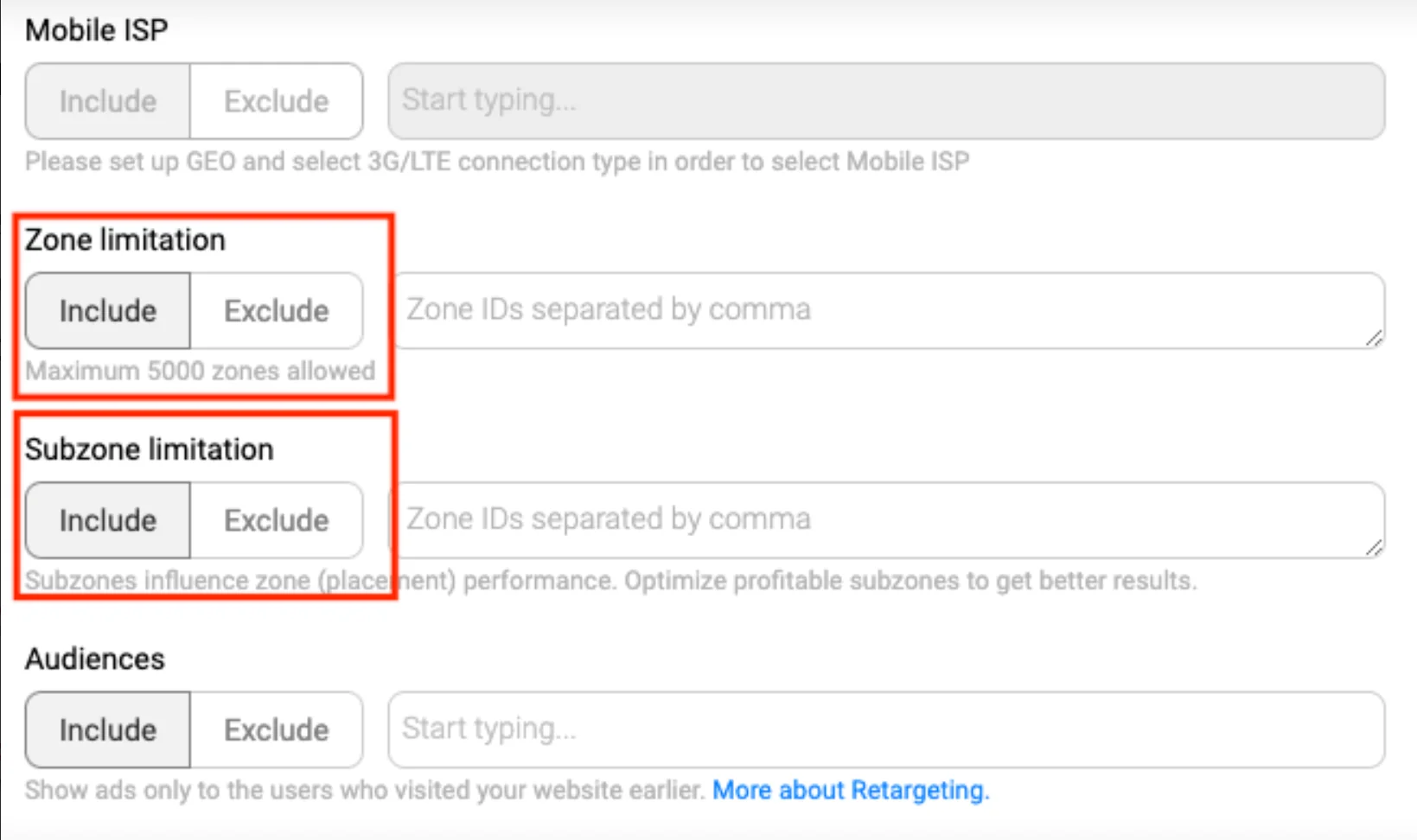
By the way, in PropellerAds, both lists are built around zones and subzones – specific traffic sources or their smaller parts.

Whitelists
According to Roman, “a whitelist is a directory of ad zones that have been proven to deliver excellent results, meaning – quality leads and conversions. This means that the target audience is right and the zone performs consistently.” In other words, these areas have higher conversion rates and deliver a better overall performance.
In PropellerAds, whitelists can include not only entire zones but also subzones – smaller traffic segments within a specific zone. This way, you can target not just the general traffic source but the exact placements that generate your best conversions.
Blacklists
On the contrary, a blacklist contains ad zones that have poor conversions and low-quality leads. By identifying these areas early on, you’ll avoid spending your budget on locations that don’t perform very well. But, as we mentioned before, remember that blacklists will vary depending on each vertical, offer, and individual campaign.
In PropellerAds, the blacklist can also be applied to subzones, too – and that’s a real game changer. Sometimes, you don’t need to exclude an entire zone. Maybe one specific subzone is the issue, while others perform perfectly. With subzone-level control, you can fine-tune your optimization and save your budget.
Subzones
While a zone represents a broader traffic source – like a website, ad placement, or partner feed – subzones divide this traffic into smaller, more specific segments.
Each subzone behaves differently: it might attract users from a certain page section, placement type, or audience group. That’s why analyzing subzones can reveal hidden opportunities inside zones that might look average at first glance.
In short, subzones let you optimize your campaigns with surgical precision. You’re not just deciding “which site” works – you’re discovering which part of that site brings money.
How to Create Black and White Lists?
“Creating blacklists and whitelists is not complicated at all, so all affiliates should use them to improve their campaign,” says Roman. “For starters, you should create and launch a campaign with the targeting options set to the offer specifications.”
Remember, for each ad zone, you should allocate a testing budget that’s 2-3 times higher than the payout. For instance, if the payout is $5, the budget on each ad zone should be around $15.
Once you have enough data, it’s time to assess the results of each ad zone.
“Ad zones that have 2-3 conversions during the testing period can be placed on your whitelist. If the ad zone didn’t have any conversions at all during the same period, it should be placed on the blacklist instead” says Roman.
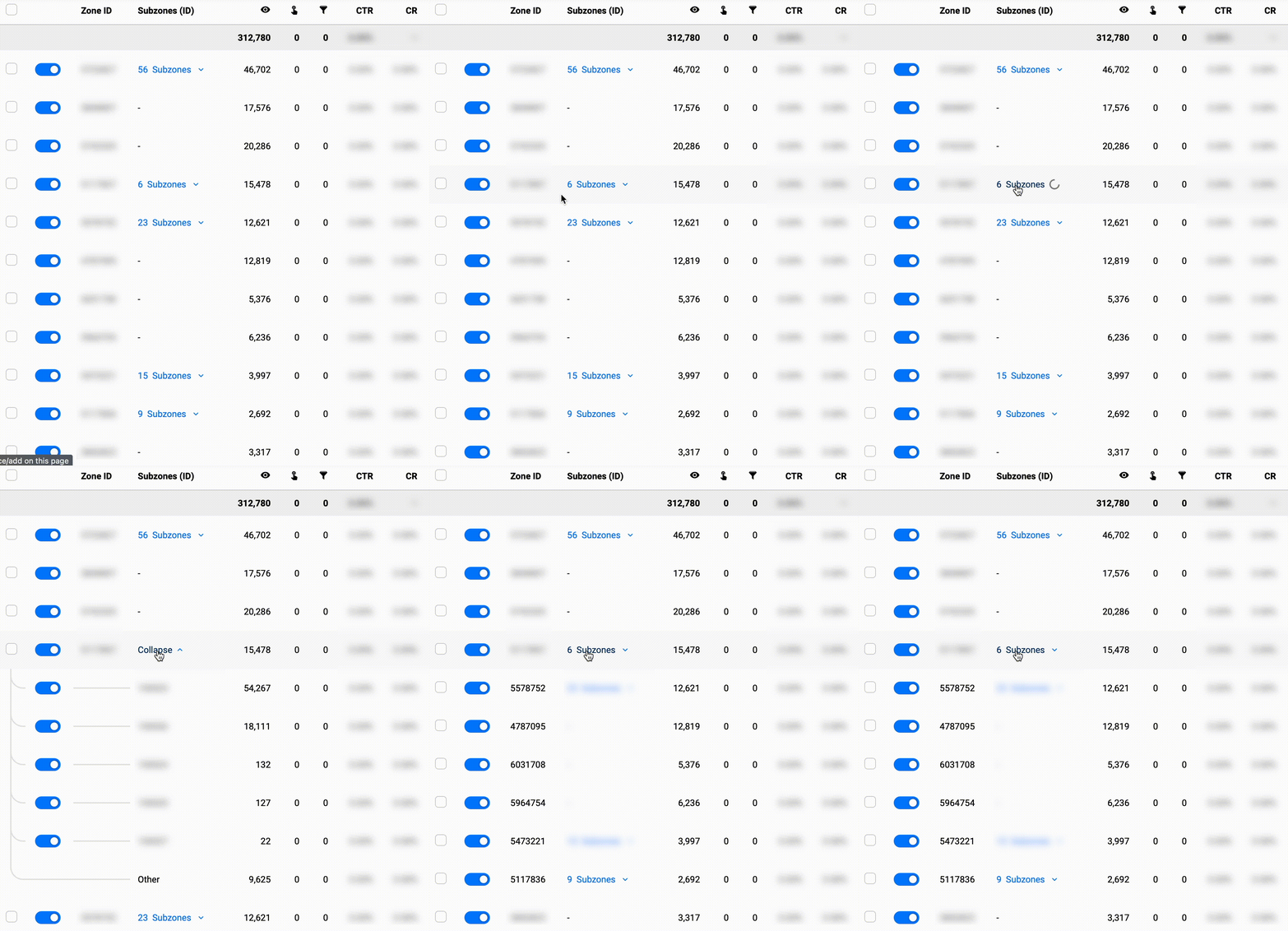
When your campaign is already on the run, you can track the results of your zone optimization efforts in the Statistics tab. Also, here you can see the whole zone divided into smaller subzones and also exclude those that don’t bring desired results:
What’s Next: White and Blacklist Strategies
“The most obvious benefit of creating blacklists and whitelists is the ability to assess the quality of each ad zone. But, there’s more than one way to properly implement these tools. As a matter of fact, they can be used independently or deployed simultaneously, depending on the outcome you want.”
Here are three basic approaches that you can use to implement these lists.
Include Whitelists Only
By only targeting whitelisted ad zones, you’ll ensure that all interactions are relevant.
According to Roman, “whitelisted zones are great because they have a higher conversion rate, but they also deliver higher quality leads, which allows you to increase your bids as well.” This setup is usually ideal if you want to attract more leads or increase conversion rates, but you’ll also want to up your bids in order to stay competitive!
- Higher conversion rates
- Higher quality leads
- Perfect if you want to increase the bids
Exclude Blacklists Only
If your main goal is to find new ad zones, the best thing you can do is exclude blacklisted areas. This way, you’ll be able to explore and discover fresh zones without falling into the same pitfall twice and save your budget.
Exclude Both White and Blacklists
Why exclude both? Because you want the system to run the campaign on as many zones as possible. So you can search for new zones… and also add them to white or blacklists later.
“Remember, whitelists ad zones allow higher bids and blacklists don’t deliver the right results, both of which can strain your budget. If you want to create a campaign that runs on as many zones as possible, excluding poor performance and already known top-performing zones.”

What to Keep in Mind
Here are a few things you should keep in mind before deploying your blacklist and whitelist strategy:
Refresh Your Lists
Consumer behavior changes over time, so you should regularly assess your whitelist and make sure it’s up-to-date.
Roman says that “it’s always important to look at your tracker and examine the performance of the ad zones. If a zone in the whitelist isn’t performing as well as it used to, you can remove it from the directory. But, don’t put it in the blacklist right away – give it some time and test it again to see if the performance gets any better or if it works with other verticals.”
Retest Dubious Zones
During your zone management, you may notice ones in between (the “gray zones”). Some of zones might be far from perfect, bringing some conversions at some point, then bringing almost nothing, then a couple of conversions, again. Usually, these are zones that worth monitoring or putting them to a so-called “probation list” for further testing.
Make a Separate List for Each Vertical
As we mentioned before, each vertical requires a separate whitelist and blacklist combo.
According to Roman, “if you are running multiple campaigns in the same industry, you may be able to use the same directories, with some adjustments of course. That said, always make sure you create these lists from scratch every time you take on an offer from a new vertical.”
Whitelists and blacklists are one of many resources available in the affiliate marketer’s toolbox. The tips above should help you implement these directories and allow you to identify the areas that deliver the best performance. Opt for PropellerAds tools for zone and subzone management to get the most of your campaigns!
Join our Telegram for more insights and share your ideas with fellow-affiliates!