Testing AI Creatives 101: Frameworks, Metrics, and Common Mistakes

If you’ve ever seen an AI-generated ad with a model holding a phone using seven fingers, congratulations! You’ve witnessed the new era of performance marketing. AI creatives are inexpensive and fast, but can easily spoil the campaign if used incorrectly.
Meanwhile, using AI for ads is no longer just a handy tool, but a must-have. For example, Meta Andromeda, a new Facebook algorithm, tests millions of ads at once and splits users into tiny micro-clusters. It means it needs a constant flow of fresh, diverse creatives. Creating that many variations by hand is impossible, but AI makes it easy.
That’s why structured testing matters.
What’s Basically Wrong with AI Creatives?
We mean, why test them separately? We all know the usual split tests and testing formulas, so why not just reuse them?
The classical testing principles aren’t going anywhere, of course. For example, Natalia Andreykina, the Team Lead of SMM at PropellerAds, believes you can simply keep using the traditional methods with no need to reinvent anything:
‘I’m sure that everything that works for regular creatives will work for AI-generated ones too. The difference is that AI gives you much more freedom – it lets you create far more hooks and attention-grabbers, including those that would be too expensive or too difficult to shoot manually.’
So, A/B split tests, hypothesis checks, comparing CTR and CR, and gradual scaling remain basic. However, AI creatives come with a couple of caveats.
1. Unstable visual quality
AI doesn’t work like a human designer. One image may look great, the next one a bit weird, and another one, nice at first glance, but full of small flaws once you look closer. If a user notices disproportionate hands, extra fingers, or strange lighting, their trust drops instantly, and so does the СR.

Natalia Andreikina:
In my opinion, people actually like high-quality AI work and are completely tired of AI-slop. Extra fingers, warped faces, unnatural poses – all of that pushes users away. It’s better to spend a bit more time writing a proper prompt to get a clean, realistic image than to launch creatives full of ‘creepy’ elements or obviously ‘robotic/AI-ish’ movements.
2. Details overload
AI often generates images packed with unnecessary elements, such as too many textures, unnatural glares, or odd, tiny details. Research shows that the brain has to work harder to decode such visuals, and user attention shifts from the message itself to simply trying to understand the picture. As a result, even a beautiful image may convert worse.
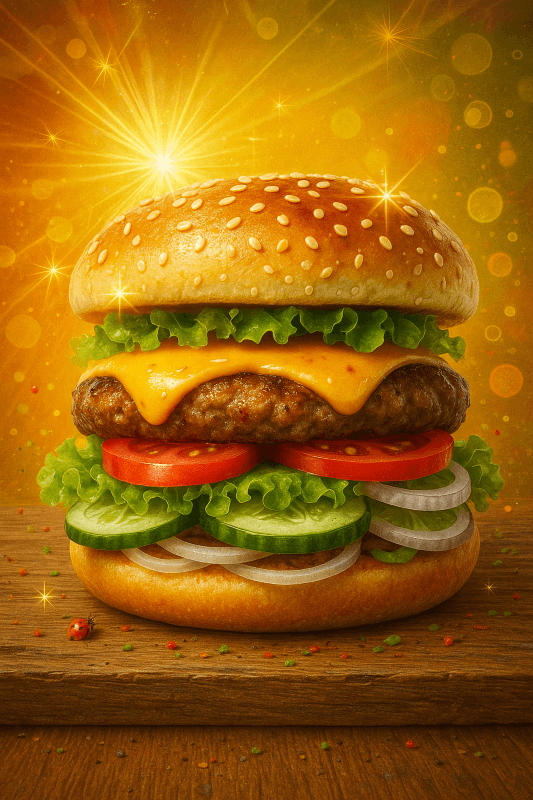
That’s why your tests should compare highly detailed AI visuals with simpler, more minimalistic alternatives.
3. Unpredictable ad fatigue dynamics
A regular designer-made creative behaves predictably: it usually delivers a certain CTR and then slowly burns out. AI creatives are different: they’re unstable. They often explode in the first 24 hours and then die fast, or, on the contrary, start weak but find their audience later.
That’s why you can’t judge AI creatives by the first day’s performance. Instead, it’s better to track how performance changes over several days.
4. The uncanny valley effect
Even if a user can’t explain what feels off, the brain still reacts to strange details, such as overly smooth skin, incorrect perspective, and too perfect symmetry. This creates a sense of tension and erodes trust in the ad.
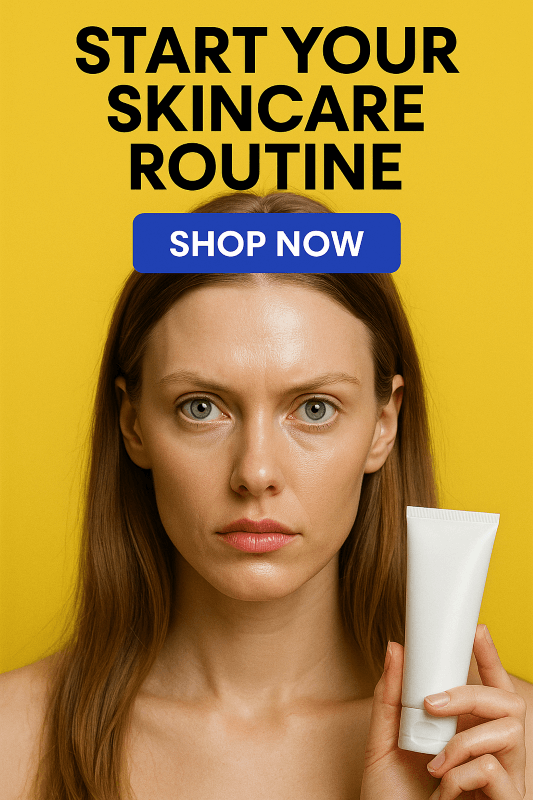
That’s why it’s important to test if an image triggers subconscious discomfort, because such visuals might still get good CTR but lead to worse conversion rates.
5. Problems with text and small elements
AI still struggles with drawing text: letters can look distorted, blurry, or like random, unrealistic symbols. The same applies to icons, buttons, money, numbers, cards, and other small details. They may seem almost fine, but look weird on closer look.
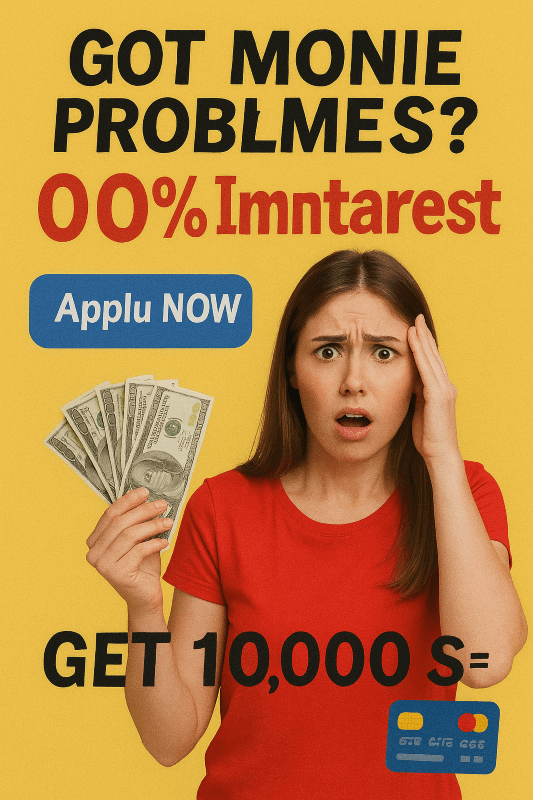
That’s why AI creative tests should compare two setups: a fully AI-generated creative vs an AI background with manually added text. The second option often performs better.
6. Logical mismatch with the offer
AI doesn’t always interpret prompts the way you expect. You ask for a Nutra theme, but it gives you a glowing blonde holding a bag of money. You ask for Finance, and it generates random futuristic diagrams. These visuals might be eye-catching, but not relevant at all.

You need to test not only stylistic variations, but also how well the creative aligns with the offer idea.
Frameworks for Testing
Now you know the pitfalls and mistakes behind the AI creatives, and it’s time to test them properly. We prepared three working frameworks that media buyers actually use.

Human-first verification framework
The point of this approach is that you first use human eyes to remove the evident AI mistakes, then let AI tools analyze them, too, and only after both checks, you run classic A/B tests on real users.
- Step 1. You pick references, write a clear prompt, and generate several AI variations. Before running any ads, you show these creatives to real people: colleagues, friends, a test audience – just to check basic reactions: which images look unnatural, which are easy to read, and which actually make sense.
At this stage, you’re also catching typical AI mistakes: extra fingers, distorted faces, impossible poses, or simply images that don’t match the offer at all.
- Step 2. You run the creatives through an AI scoring tool (Dragonfly, AdpowerX, Neurons, or even ChatGPT Vision). These tools highlight visual overload, missing contrast, broken logic, and weak points. Neurons, for example, can even predict attention heatmaps and compare your creative against other high-performing ads, showing if it has the winning pattern or not.
Here is how it works with Neurons:
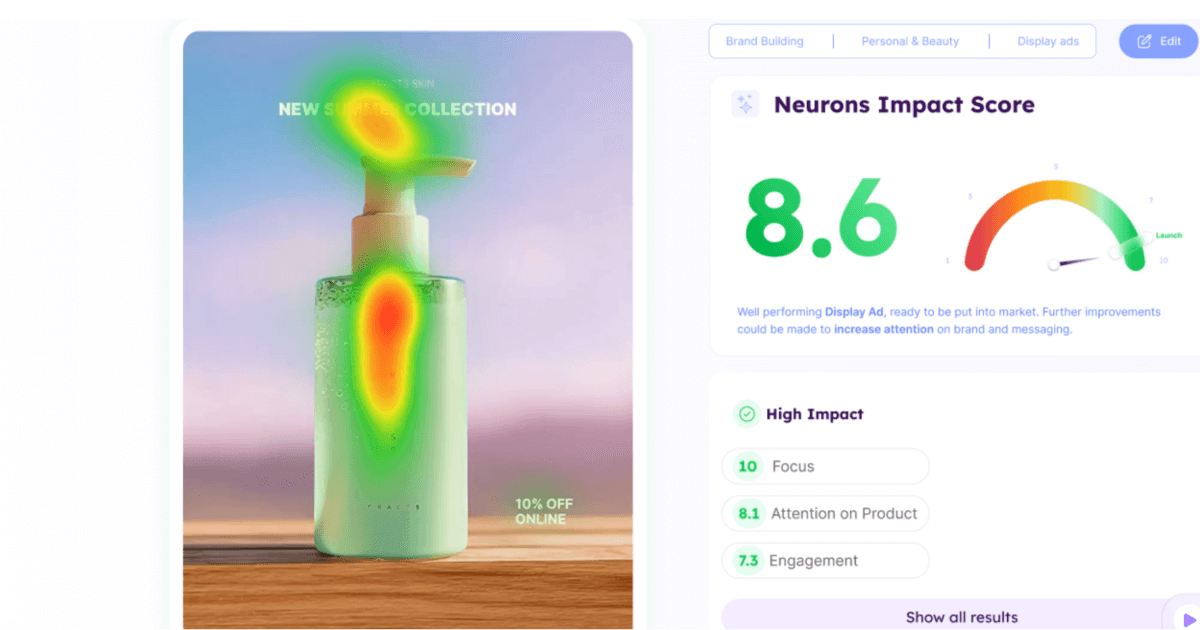
Source: https://www.neuronsinc.com/neurons-ai
And this is a simpler analysis with ChatGPT Vision:
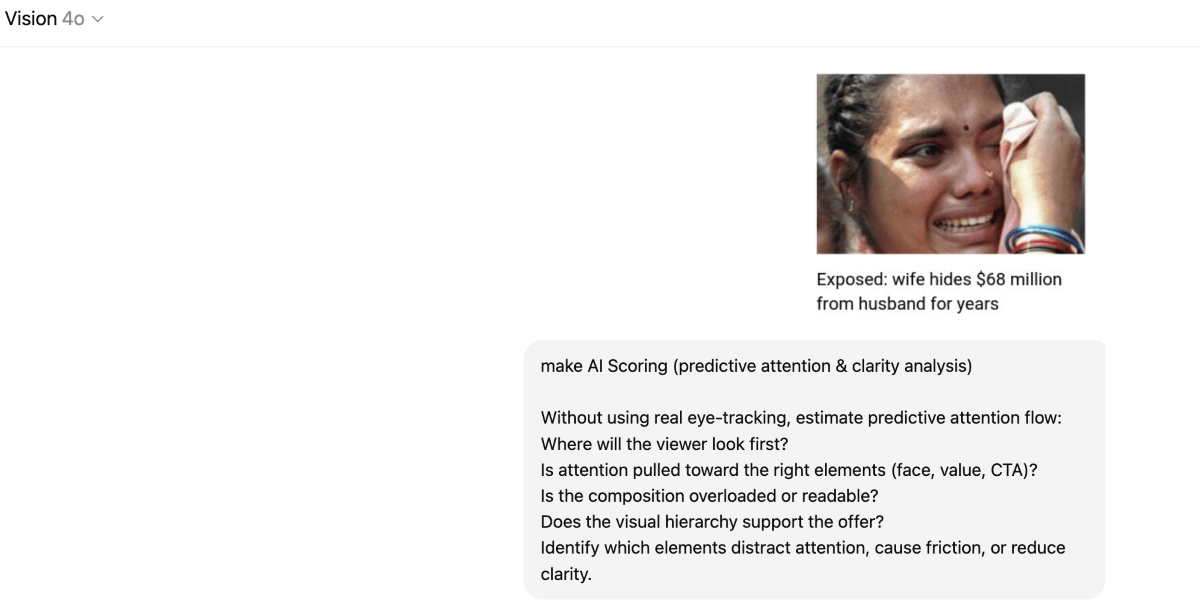
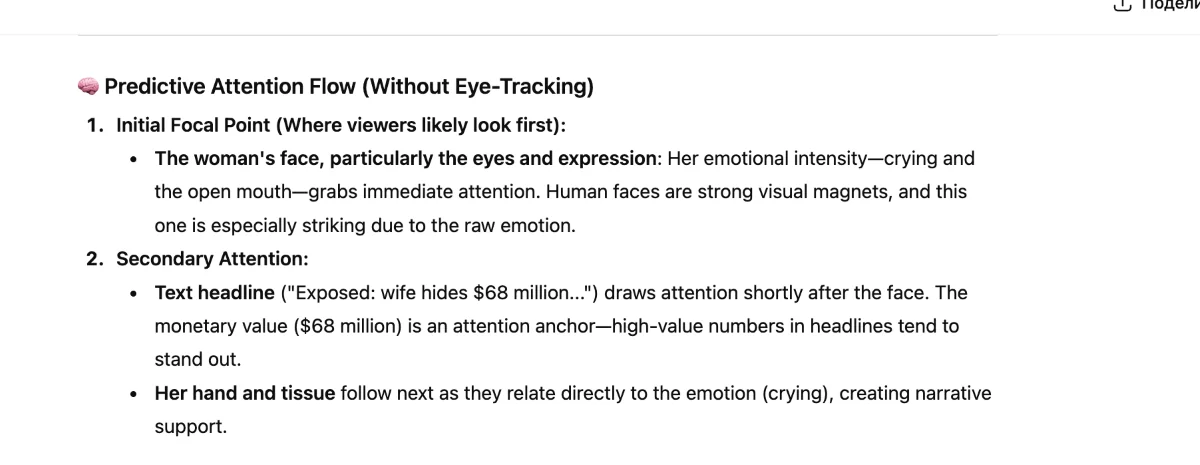
- Step 3. You compare human impressions with AI diagnostics, pick the best creatives, and only then run a classic A/B test in real traffic.
Total AI-Approach: Anti-Ad-Fatigue
In this workflow, AI produces large volumes of variations, filters them, and a human touch is almost not required. It’s more about keeping your creatives alive for longer.
- Step 1. You feed the model your assets: colors, fonts, style, or examples of previous ads. Based on this, the AI generates a huge number of variations, changing composition, background, style, text, angles, and adapting them to different formats.
- Step 2. After generation, you use the AI evaluator, which analyzes each banner – just like it was described in the previous workflow.
- Step 3. As a result, you automatically get a selection with the highest-scoring creatives. The human role is minimal: you simply pick the top 10-20 finalists, run them in a real traffic test, monitor performance, and gradually turn off the losers.
- Step 4. Meanwhile, the AI continues to generate new creative batches, and the cycle repeats. Instead of waiting for CTR to collapse, you refresh creatives early. AI continually generates new batches, allowing you to replace the old ones with alternative versions before their performance declines.
This example of this framework is described in detail in the case study of Häagen-Dazs, an American ice cream brand. Häagen-Dazs faced a creative-fatigue problem: their ads were burning out fast, engagement kept dropping, and they needed far more variations than their team could produce manually.
To fix this, they switched to mass creative testing with AdCreative.ai. The AI generated 150+ variations per product, scored them automatically, and only the strongest ones went into live testing. As a result, Häagen-Dazs significantly boosted engagement: over 11,000 ‘Get Directions’ clicks in one month, and reduced CPM by $1.70.

Video Testing Framework
Testing videos is not significantly different, but you need to know which parts of the video to change for testing.
- Step 1. You create several versions of a video creative. In each version, change prompts to have several variations of the hook (the first 1-2 seconds), style (UGC, cinematics, surreal, or WOW-effects), length, voiceover, pacing, and text overlays.
- Step 2. Review the videos from a human perspective and eliminate any content with uncanny faces, strange AI movement, logical errors, unrealistic shadows, incorrect visuals, and other AI artifacts. Leave the usable pool of the best videos.
- Step 3. Use AI-scoring through Dragonfly AI, Neurons, AdpowerX, or other networks. It will show what drives user attention in the first seconds, where viewers might drop off, what overloads the video, and if the overall composition is fine.
- Step 4. Launch the real A/B tests and track the metrics.
Note: All the frameworks might involve comparison of AI and human creatives as one of the steps. We’ll touch upon this in the next part – the one about metrics to check when testing.

What Metrics To Track?
When you test AI-generated creatives, you still rely on all the classic performance metrics – CTR, CPC, CPM, CR, engagement rate, scroll depth, watch time for videos, and so on. AI ads are still ads, so the fundamentals don’t disappear.
But as we already know, AI creatives behave differently, which means you need additional metrics to understand their real performance:
- Check CR not only on day 1 but across 3-7 days: AI creatives may gain traction later once algorithms find the right audience. However, they might also burn out quickly while achieving a high CTR initially.
- Compare AI vs. human creatives: this tells you whether AI truly beats your usual production.
Here are the two special AI-testing metrics that give you more clarity:
- Percentage of usable AI creatives. It means how many generated creatives are actually good enough to launch – no weird hands, no creepy faces, and no uncanny valley effect. For example, you generated 20 creatives, and 7 of them are totally usable. It means a 35% usable rate.
Knowing this helps you understand how much test-ready content you actually get from each generation batch. A 35% rate means AI wastes 65% of what it produces, so you might need to generate more. Besides, it allows you to compare different neural networks and find the one that fits your needs best: say, your Midjourney’s usable rate is 30%, and Nano Banana gives you 60%.
Finally, it helps you plan time: if you can use, say, 20-30% of your AI creatives, your real speed is not 20 images per batch, but only 4-6.
- AI vs. Human Performance. Here, you compare AI vs. human-made creatives by CTR and CR or other metrics, essential for your campaign. Here is an example:
| Metric | AI | Human |
| CTR | 1.9% | 2.8% |
| CR | 5% | 7% |
This reveals if AI is good enough to scale or is still worse than your designer workflow.
Extra Tips for Testing AI Creatives
Natalia shares several tips to help you test AI visuals more effectively, from selecting the right tools to exploring different angles and creative ideas.
Find the right AI
Different AI tools work better for different types of tests. Here are some recommendations:
- Midjourney and Seedream 4 are ideal for trying creative concepts when you want AI to generate new ideas, as they often improvise.
- Nano Banana is better suited for tests that require precise variations, as it strictly follows prompts and works best with text and logos.
- Higgsfield Popcorn can turn a single frame into four different variations. So, it’s a good one for testing different angles or scene settings. Sora Images, Imagen 4, and Flux are also strong photo models to try out.
- Veo 3 and Sora allow you to test short video hooks with sound. However, if you need the maximum keyframe accuracy, your pick is KlingAI.
Push bolder ideas
AI gives you the freedom to go wild, so take advantage of it. Don’t be afraid to test WOW-effect concepts, such as exploding-head visuals or surreal elements, that instantly grab a user’s attention.
We are in the era of TikTok, which means your ad needs to stop the scroll almost instantly – and AI allows you to test much more catchy options.
Use AI for enhancements
AI isn’t just for generating visuals from scratch. It’s also helpful for polishing and adapting creatives during the testing phase – small adjustments can make or break performance when you test.
So, with AI, you can quickly add your logo to a stock image, change the atmosphere, tweak colors, or place the product in the model’s hand.

To Sum Up
AI opens the door to crazier ideas, faster iterations, and more versions than ever.
So, it’s unlikely you can stay competitive without it. That’s why a clear testing approach matters.
Once you find what works for you, you can move faster, test smarter, and spot winning creatives with much less effort.
Join our Telegram for more insights and share your ideas with fellow-affiliates!